S3 USE AWS MANAGED IAM
Two solutions are provided below.
Mode I
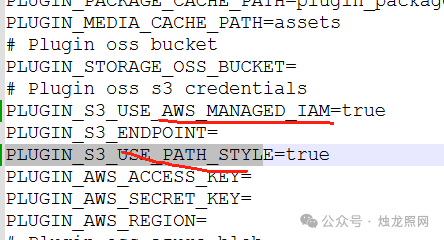
- 1. Modify.env profile
The amendments read as follows:
PLUGIN S3 USE AWS MANAGED IAM=true
PLUGIN S3 USE PATH SYLE=true
- 2. Modify the docker-compose.yaml profile
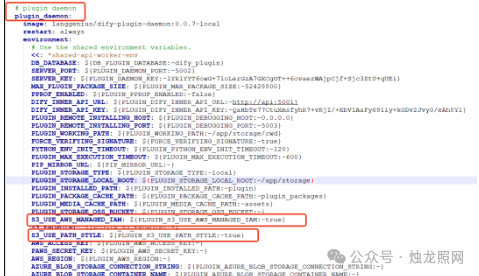
First, we found the pugin daemon configuration section and modified the values of S3 USE AWS MANAGED IAM and S3 USE PATH STYLE, as shown below.
S3 USE PATH SYLE: $ {PLUGIN S3 USE PATH SYLE:-tru}
S3 USE AWS MANAGED IAM: $ {PLUGIN S3 USE AWS MANAGED IAM:-true}
Modify and restart.