Disk space does not release once the docker rm deleted mirror
I. The root cause of the problem: WSL2 is a "pretty"!
(Coughing)You think you can make room by deleting Docker's mirror? Too naive!
- WSL2 is virtual.: You play Docker in Windows? It's actually running a Linux virtual machine in the backstage!
- The virtual hard drive file is a hooligan.: This stuff expands itself (e.g. from 10G to 50G), but it doesn't shrink when it's deleted!
-
The truth.:
docker rmi"I don't give a shit, I don't give a shit!
(Sniffling)"It's like you throw trash in your room. The garbage bag will automatically get bigger, but the garbage will be a drum."
II. A solution to the violence: hand-to-hand virtual hard drive!
STEP 0: Find the culprit file
Path:C:\Users\<你的用户名>\AppData\Local\Docker\wsl\data\ext4.vhdx(blood tears warning)
-
Freeze!
docker-desktoporUbuntuVhdx file! - It is recommended that we copy the path directly.
STEP 1: Kill WSL2 and Docker Process
# 管理员模式打开PowerShell! wsl --shutdown # 给WSL2断子绝孙掌 wsl --list -v # 检查所有WSL状态必须都是"Stopped" 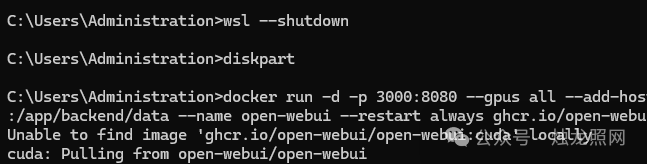
(SPEAKING IN LANGUAGE)
- The taskbar exits the Docker Desktop count! Orders must be used to confirm the process is dead!
-
If you see a release or Running, use
wsl -t <发行版名>Swords!
STEP 2: Call on Windows ancestral compression
# 进入DiskPart(手别抖!) diskpart # 选中你的虚拟硬盘文件(路径粘贴进来!) select vdisk file="C:\Users\你的用户名\AppData\Local\Docker\wsl\data\ext4.vhdx" attach vdisk readonly # 先礼后兵只读模式 compact vdisk # 开始压榨空间! detach vdisk # 完事提裤子走人 (Key details)
- If you're wrong, the file is occupied, go back and check STEP 1!
-
compactThe process may be stuck? Normal! The bigger the files, the slower they go, the more coffee they wait!
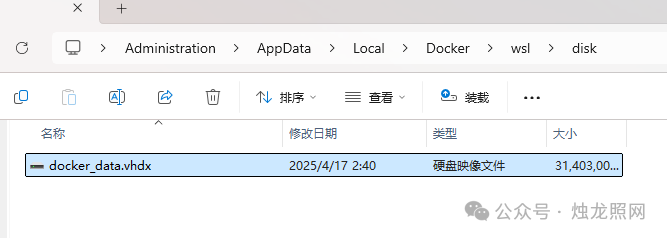
STEP 3: Receiving and Inspection Results
- Go to drive C and see the rest of the space.
- Reopen Docker Desktop, mirrors and containers!
III. Daily blast guidelines
Regular cleaning of Docker garbage
# 核弹级清理(慎用!) docker system prune -af # 删光所有镜像、容器、网络 ♪ To survive ♪
- This order is not accepted by my mother!
2. Transfer of Docker data to other disks
- Open Docker Desktop, Settings, Resources, Advanced
- Modify "Disk image migration" to D/E(principles raging)"Let WSL2 go to another game, and the C drive will laugh at the wind!"
3. Ultimate Austria: Reset WSL2
wsl --unregister docker-desktop-data # 删库跑路大法 "It's like formatting! The C drive is thin, but all Docker's data is gone!"
IV. GUIDELINES FOR THROAT SERVATION
Q: No changes in compressed space?A: Three possible scenarios:
-
Wrong path.
data\ext4.vhdxI'm not sure. -
WSL2 is clean.
wsl --list -vSecond confirmation) - There's no admins.
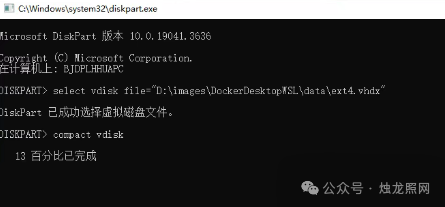
Q:compact vdiskWrong?A: Check these three orders sequentially!
-
select vdisk file="正确路径" -
attach vdisk readonly -
compact vdiskWrong order of direct GG!
Q: Failed to start Docker after changing storage path?A: Give the new path full control!
- Right-Key Folder Query Properties Query Edit Queue Add "Euper" Quest Full Control
(end assault)
"transmit this one! Have your programmer say goodbye to C-roll anxiety! The next time someone yells at the red C-roll and dumps the article on his face -- "Papa!"
(Xenith added)"Performance of the collection, C-discretion never goes red in three years!"
(author shattering )"In order to test this program, I've reded the C drive eight times and now I see the .vhdx file trying to smash the computer!
Problem? Get in the group.