
OpenClaw ChineseAide (2026)
Still got a headache for the complex Docker? I'll teach you a simpler way today -- two lines of command to deploy your exclusive AI housekeeper on Windows!
Core highlight
✅ One-key script installation without manual configuration
✅ Data is fully stored locally, privacy is safe
✅ Supports the call of large models API and links local models
All Chinese interface, zero threshold.
Why OpenClaw?
OpenClaw is a fully open-source assistant. You can imagine it as one.That's what I'm talking about.I don't know. Besides talking, it can:
- Control your computer files.
- Control browser auto-fills, captures data
- :: Enforcement of system orders (requirement for authorization)
And the greatest advantage of local deployment isPrivacy security— All the records and documents of the dialogue remain on your hard drive, never leaking.
Preparations
Before starting, make sure your computer meets the following conditions:
- Operating systems: Windows 10/11 (64 places)
- Administrator Permissions: required during installation
-
Network's open.: Accessible
clawd.org.cn(domestic mirror)
Small tip: If you have previously installed an old OpenClaw, it is recommended that you unload it and implement the new installation.
Installation steps (not to exceed 3 minutes full)
Step 1: Install the core program with one key
- Enter in Windows Search Bar PowerShellright-click selection Run as AdministratorI don't know.
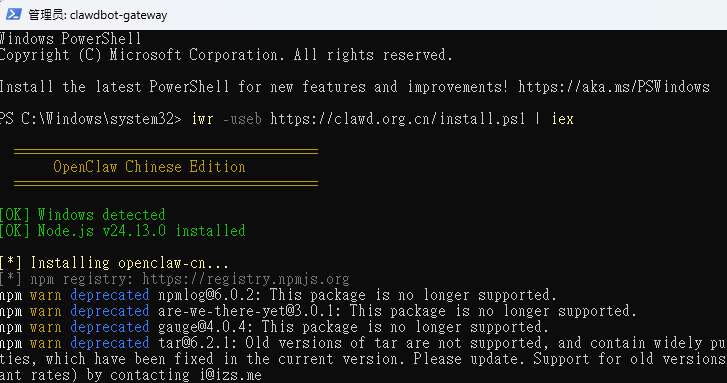
- In the blue window that pops up, copy the following command and press back:
iwr -useb https://clawd.org.cn/install.ps1 | iex
-
Waits for scripts to run automatically. You can see all kinds of installation on the screen.No operation required♪ Until it appears ♪
安装完成!the hint.
This order will automatically download and install OpenClaw ' s entire dependency (including the Node.js environment) for approximately 1-2 minutes.
Step 2: Run the first configuration wizard
After the installation,Do not close PowerShell, we proceed with initialization settings:
- In the same window, enter the following command to start the wizard:
openclaw-cn onboard
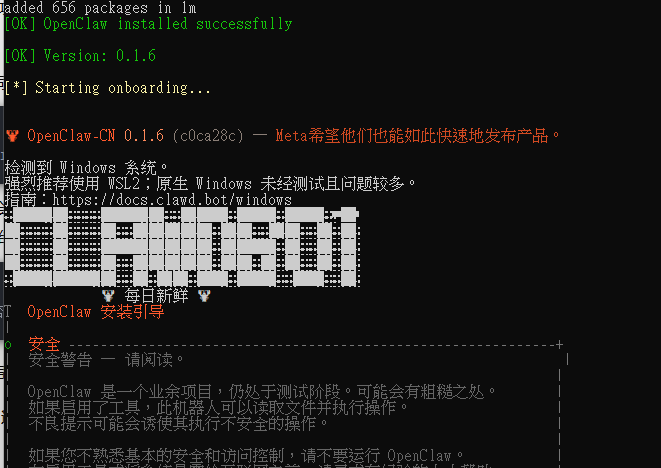
- You'll see a welcome interface like the next one. Y Then go back to the car and agree to start the configuration:
? 是否开始配置OpenClaw? (Y/n) › Y
-
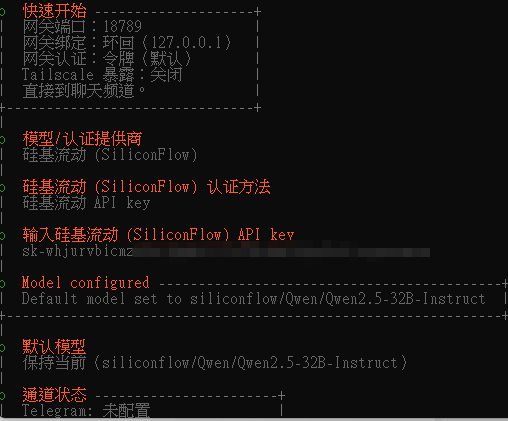
The wizard asks in turn:
-
Selection of model supplier: recommended selection
阿里云百炼orDeepSeek(Pilot for domestic users). - Enter API Key: Paste the API key that you requested from the model officer network.
- Set administrator password: To access the Web management interface.
-
Selection of model supplier: recommended selection
- Upon completion of all settings, the wizard automatically starts OpenClaw service.
Step 3: Launch
The configuration wizard will automatically open your default browser and jump to http://localhost:18789I don't know. If not, enter this address manually in the browser.
- Enter the administrator password login just set
- Now you can talk to your local AI assistant!
Progress Settings (optional)
How to modify the model or API Key?
If the model or configuration needs to be changed, the configuration wizard can be run again:
openclaw-cn onboard
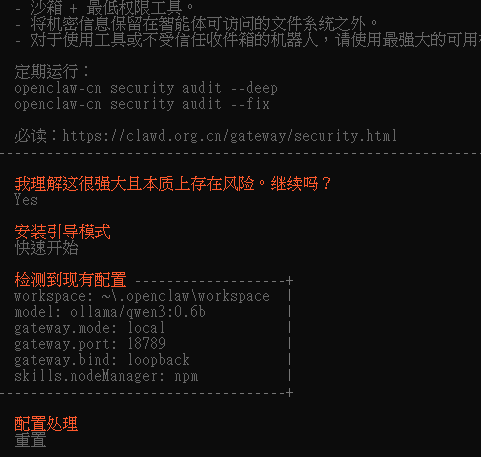
It will read your previous configuration. You can choose to modify any item.
How can OpenClaw turn itself on?
The installation script has automatically registered OpenClaw as a Windows service, which will automatically run in the backstage when it opens. You don't need any extra operation.
How to stop/restart the service?
Execute in PowerShell for administrator privileges:
openclaw-cn service stop


openclaw-cn service start


openclaw-cn service restart
Common Question Answers
Q: What about the hint at installation that “the file cannot be loaded ... has not been signed”?
A: This is because of PowerShell's implementation strategy constraints. Please run PowerShell as administrator, first. Set-ExecutionPolicy RemoteSigned -Scope CurrentUserand then execute the installation order.
Q: How do you modify the API Key that was wrong in the configuration wizard?
A: Direct rerun openclaw-cn onboardIt'll make you reconfigure.
Q: Visits http://localhost:18789 Can't open it?
A: Check if OpenClaw is running: in PowerShell openclaw-cn service statusI don't know. If Show Not Run, Execute openclaw-cn service start Start.
Q: Can I use my own computer's local model, like through Ollama?
A: Of course! Select "Ollama" or "Customise" among model providers that configure guides, and then fill in your local model address.
At the end.
This one-key installation allows you to have a powerful, fully private AI assistant on Windows without contact with Docker, without manual configuration of environment variables. It not only protects your data privacy, but also expands the capacity boundaries by installing various skills plugins.
If you have any problems with the installation, please leave a message in the comment area and we'll answer it first!